Sunday, October 19, 2008

IK Multimedia T-RackS 3


Announcing T-RackS 3
Beyond Mastering

The new T-RackS 3 raises the bar again in high-end DAW mastering and mixing, with a suite of 9 analog modeled and digital Dynamics/EQ processors, an audio quality that is unmatched in software, and scores of new and unique features.

Modular High-End Mastering/Mixing Suite of Dynamics and EQ processors, including:

  • 9 processors comprised of 3 new analog and vintage emulations (including models based on the Fairchild 670 and the Pultec EQP-1A), 2 new digital processors as well the 4 classic, award-winning T-RackS processors
  • New configurable mastering/mixing chain – run up to 12 parallel/series processors
  • New complete built-in metering section with Peak, Perceived Loudness, Phase, and RMS meters, plus a Spectrum analyzer with Peak, RMS and Averaging indicators
  • New standalone and plug-in versions available in the same package for use in all the most popular native DAWs
  • New high-fidelity oversampling with crystal clear transparency, for high quality audio processing throughout the entire signal path
  • New SCC™ technology coupled with IK’s unique DSM™ technology provides the most realistic software emulation of vintage gear to date
  • Extremely easy to use, with style-based presets, full chain visualization, one-click single module or chain bypass, “compare” function, multiple audio processing in standalone mode and much more

T-RackS 3 has all the tools you need to create superb, tube-toned or digital-tuned, mixes and masters. Its rich, warm sound combines new tube-modeled and state-of-the-art digital processors on top of its classic top-notch analog classics. A new modular chain gives you full control and easy navigation/compare features. A new complete metering section keeps all the most important variables of your sound under control. A truly superior mastering and mixing system that will put a polish on your tracks you may have never thought possible. All this, while adding the beautiful warmth and space of the tube devices it emulates. No other plug-in offers this kind of dedicated environment for such an important task, and nothing sounds like T-RackS 3.

MORE INFO

Read More

Monday, October 13, 2008

AuraPlug releases AmpFire

Acoustic Guitar Simulation

Acoustic guitar modeling from electric guitar sound

How many times has it occurred on stage or in a studio that a good acoustic guitar sound would have been needed, but that’s not easy to attain neither on a stage, nor in a studio. (just think of the acoustic feedback effect for instance) As an alternate solution, we model the sound of the acoustic guitar and generate it from the electric guitar’s. Several software solutions have been worked out for the simulation of the acoustic guitar’s sound, but none of the products have achieved a truly realistic sound so far. The simulation of AmpFire Acoustic Guitar is trying to fill up this empty space. The acoustic guitar simulation found in the AmpFire generates a piezo acoustic-effect guitar sound from the electric guitar sound with the help of a special algorithm.

The lost body-sound

When modeling the acoustic guitar one of the greatest challenges is generating the body-sound, typical characteristic of acoustic guitars. With the help of a special algorithm AmpFire adds this lost ‘body-sound’ to the sound of the electric guitar, generating the feeling of a piezo acoustic guitar’s sound. Currently AmpFire plug-in contains one body model, with tone control options.

Sound sample

Among the sound samples there’s a ‘before/after’ sample on our page, the first part of which contains the sound of an electric guitar without added effects, and then the same sound with AmpFire Piezo Acoustic simulation.


AmpFire Features:

* Built-in Noise Gate
* 13 Preamp/Distortion model
* 4 Clean Amp Model
* Acoustic Guitar simulation
* 8 Distortion model
* 3 band equalizer for every Preamp/Distortion model
* 38 Amp/Cabinet model
* Bass, Treble control
* Loudness control
* Separate Preset Manager
* Over 80 Preset
* Easy to use
* Low CPU usage

AmpFire Specs:

Noise Gate unit:
Noise Gate On/Off
Threshold
Preamp/Distortion unit:

Preamp/Distortion On/Off
Preset control

01. Clean 1
02. Clean 2
03. Clean 3
04. Clean 4
05. Piezo Acoustic
06. Tube Creamer
07. Fuzzz
08. Metal Charter
09. Metal Machine
10. Metal Style
11. Power Metal
12. Dirty Box
13. Darktorsion

Level
Drive
Color
Presence
Low frequency gain control
Middle frequency gain control
High frequency gain control
Amp/Cabinet Model:
Preset control

01. AmpFire CAB1
02. AmpFire CAB 2
03. Selection G12H
04. Mandarin 4x12
05. AmpFire CAB3
06. Hit Watt
07. Mpeg+Marsall
08. Cox
09. Phender DR
10. Harley Beton
11. AmpFire CAB4
12. AmpFire CAB5
13. 4x12 CAB+eq1
14. Metal Style
15. 4x12 CAB+eq2
16. JGM 900
17. Randoll
18. PowerDude 1
19. PowerDude 2
20. AmpFire CAB6
21. HighWidth4x12
22. Meza style
23. Mpeg 8x10
24. Fender Passman
25. CAB 4x12
26. Meza 2x12 A
27. Meza 2x12 B
28. Sidewinter
29. Pro Jr.
30. AmpFire CAB7
31. Marsall 1960
32. Meza Cookie

33. Death Metal
34. Classic Metal
35. Modern 1
36.
Modern 2
37. Modern 3
38. 90's Spirit

System Requirements:

* Windows® base PC
* Plug-in format: VST
* Minimal: Pentium 1GHz / Athlon XP 1.33 GHz, 512 MB of RAM, Windows XP
* Optimal: Pentium 2.4 GHz / Athlon XP 2.4 GHz, 1 GB of RAM, Windows XP


Read More

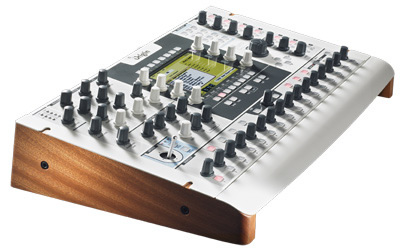
Arturia Origin

Be Original... Origin is the first hardware synthesizer from Arturia. It is a modular system of a new generation opening innovative avenues in sound design.

Origin

Origin goes beyond the traditional definition of synthesizers. It is a hardware DSP system that houses several synthesizers in one machine. Some of these synths come from the past, such as the Minimoog, some are totally new and innovative.

Loaded with modules extracted from the best synthesizers of all time, Origin lets you combine these modules and take advantage of the additional possibilities put onboard.

The result: a new type of sound accessible through an extremely intuitive interface.

Main Features:

  • Create your own synthesis patch by connecting independent modules. These modules are either innovative modules Arturia introduced (such as Galaxy) or taken from the best synthesizers ever made (such as the Moog Modular, the Yamaha CS-80, the Roland Jupiter-8, the Minimoog, the ARP 2600, the Sequential Circuits Prophet 5 and Prophet VS).
  • Alternatively, use an existing synthesizer recreation: the Minimoog, the ARP 2600*, the Jupiter-8* or the Prophet 5*.
  • TAE engine in a hardware chassis. 24 bits/44.1 kHz supported.
  • High-Quality Real time Effects: Phaser, Chorus, Delay, Reverb, Distortion, Parametric EQ*, Bit Crusher*.
  • 500 presets created by a selection of international sound designers.
  • 16/32 step advanced sequencer allowing you to program three sub-sequences at a time and to perform live.
  • Multi mode allowing you to play 4 instruments at a time, for example a Minimoog, a Jupiter-8*, a modular patch and an ARP 2600*.
  • Creative Macros, advanced LFOs, innovative modulation sources, different Joystick modes.
  • Advanced Preset browser.
  • Analog Audio Connectivity: 2 audio ins, 10 audio outs.
  • Digital Audio: SPDIF out, USB 2.0.
  • Built-in expression pedal and footswitch control inputs.
  • MIDI: In, Out, Thru or USB 2.
  • Up to 32 voices of polyphony.
  • Also a MIDI controller offering 33 encoders, 21 potentiometers and 1 joystick.
  • Ergonomic hardware design and quality manufacturing in France and Germany.
  • Origin lets you open dedicated software on your Mac and PC in the form of Origin Connection an ergonomic application allowing to archive preset, exchange data, upgrade firmware**.
  • 160 pages manual in English.
Read More

Monday, October 6, 2008

Pro Tools 8

Stunning New Look and Interactivity
Sporting a sleek new look, Pro Tools 8 is as easy on the eyes as it is to use. All of the Pro Tools functionality you know and love is still in place but with some subtle enhancements, double the inserts per channel, more customizability, and easier access to editing options than ever before. Customize the toolbar to show only your favorite tools, and rearrange them the way you want. Tile or cascade your window arrangement. Change the color of your channel strips, tracks, regions, groups, and markers to any hue. Navigate through sessions quickly using the Universe view. And with the QuickStart dialog, you can jump right into an existing session, quickly create a new session from scratch, or start from one of the new session templates.


A Well-Stocked Studio
Pro Tools 8 comes fully packed with a huge, comprehensive collection of music creation and sound processing plug-ins, giving you a well-stocked studio right out of the box.

Create and play music with groundbreaking new virtual instruments, including the Mini Grand piano, Boom drum machine, DB-33 tonewheel organ, and Vacuum and Xpand!2™ synths. Dial-up awesome guitar tone with Eleven™ Free and SansAmp®. Play DJ with Torq® LE. Add character to tracks with 20 new AIR effects. Make music with nearly 8 GB of high-quality loops. And with dozens of professional sound processing plug-ins and tools at your disposal — including nine new additions worth over $1,300 (USD) on their own — you can fix, enhance, and polish your mixes with ease.


More Tracks Than Ever
Got Pro Tools LE or Pro Tools M-Powered? Get ready to create even larger mixes than ever.

Pro Tools 8 expands the power of your current hardware interface, allowing you to work with up to 48 mono or stereo audio tracks. Add Music Production Toolkit 2 (for serious musicians and music producers) or DV Toolkit™ 2 (for complete post production, Pro Tools LE only) and you can create huge mixes, with up to 64 mono or stereo audio tracks. And with the new Complete Production Toolkit (Pro Tools LE only), which combines both toolkits, you can work with up to 128 audio tracks AND get 7.1 surround mixing capabilities, making it easier than ever to collaborate with Pro ToolsHD users.


Score Your Music
The new Score Editor lets you view, edit, arrange, and print MIDI data as music notation.
Whether you want to compose music using the notation tools, or transcribe recorded, imported, drawn (with the Pencil tool), or step entered MIDI data into notation, the Score Editor features everything you need and nothing you don’t. Write parts on a single staff (choose treble, bass, alto, or tenor clef) or grand staff. Place and edit notes, and edit the meter and key signature at whim. Add chord symbols (Dm7, G, and so on) and chord diagrams (for guitarists) to sessions. Transcribe MIDI parts in real time. Print out a score in its entirety or print only certain instrumental parts. You can even export sessions as Sibelius (.sib) files for further finessing in Sibelius.

Complete MIDI Production
If you use virtual instruments and MIDI, Pro Tools 8 features a comprehensive array of new MIDI tools. Gain extensive MIDI editing power through MIDI Editor windows, which can display MIDI and automation data for Instrument, MIDI, and Auxiliary Input tracks. Work with new features that let you separate, consolidate, and mute MIDI notes; scrub and shuttle through parts; view superimposed MIDI and Instrument tracks for easier arrangement editing; color code MIDI notes by track, type, or velocity; audition velocity changes; and play MIDI notes when tabbing. Edit MIDI automation and continuous controller (CC) data through multiple Automation and Controller lanes. Even watch your musical handiwork scroll by in real time during playback.

Transpose with Elastic Pitch
As a complement to Pro Tools software’s powerful Elastic Time tempo and time manipulating tool, Pro Tools 8 introduces Elastic Pitch, which allows you to effortlessly manipulate or correct the pitch of any audio region in real time, right inside the Edit window.
Easily transpose an entire audio region in semitones — up or down up to four octaves — without affecting its timing or tempo. Fix a less than perfect vocal performance by altering the pitch of individual notes in cent intervals. Or create cool sound effects by linking pitch changes with time compression/expansion using the Varispeed algorithm.

Comp Tracks to Perfection
Creating flawless performances is easier than ever. Pro Tools 8 features new track compositing workflows, enabling you to quickly and easily piece together the best possible version of a performance from multiple recording passes. Simply loop record multiple takes on an Audio track, view and audition the takes in Playlist view, select the best parts from the track’s alternate playlists, and copy them to the main playlist with a single click. You can also rate regions on a scale of 1 – 5 to help identify which takes you like the most when compositing playlists.


New Editing and Mixing Capabilities
Pro Tools 8 equips your system with even more editing and mixing capabilities.
Lock regions to the timeline to prevent them from being inadvertently moved or edited. Use the Automation and Controller lanes to view and edit track automation (such as volume, pan, and plug-in automation) and MIDI CC data (such as velocity, pitchbend, and modulation) without changing track views. And with 10 inserts to play with per track, you can now use more plug-ins than ever before.


Expanded Pro ToolsHD Features
Pro Tools HD 8 extends the extensive capabilities of Digidesign’s Pro ToolsHD audio hardware with the new Satellite Link option, which allows you to control up to five Pro ToolsHD systems as one.
For the ultimate in post-production efficiency, the new Video Satellite and Video Satellite LE options bring Avid® and QuickTime HD/SD video playback to Pro Tools in high definition, without sacrificing your audio track counts or processing power. Pro Tools 8 also delivers major enhancements to ICON users, bringing new functionality to the Soft Keys, adding a local assign mode, introducing I/O view, and letting D-Command® and D-Command® ES users expand their console to 40 faders.


Expanded Hardware Control
Pro Tools 8 deepens its ICON console, Digidesign control surface, and M-Audio® controller integration, enabling you to map plug-in parameter controls to almost any encoder on your controller, and access each track’s 10 inserts. With ICON, Pro Tools 8 brings new and improved functionality to the Soft Keys; adds a local assign mode for assigning Inserts, Sends, Inputs, and Outputs; introduces I/O view; and lets you expand a D-Command® or D-Command® ES console to 40 faders with an additional Fader Module.

More Great New Features
Pro Tools 8 is chock full of many other amazing new features that’ll help you become more efficient, inspire your creativity, and provide more flexibility for your workflow needs. Here’s what you can experience when Pro Tools 8 hits the streets:
  • Check for Updates feature keeps Pro Tools and your plug-ins up to date
  • Windows Vista (32-bit Business or Ultimate) support on Pro ToolsHD
  • QuickTime HD support on Mac OS X-based systems
  • Enhanced session open and close times on Pro ToolsHD
  • Supports files up to 4 GB in size, letting you work with longer files with higher sample rates


Read More

Izotope Ozone 4

Ozone 4 builds on the program's reputation for superior sound quality and industry-standard mastering tools with new innovations. iZotope has updated and expanded Ozone's processing algorithms, optimizing them for today's low-latency DAW environments. Ozone 4 features a new Intelligent Loudness Maximizer, Perfect Reconstruction crossovers, mid/side processing for superior control over the sound stage, and a new True Envelope dynamics processing mode. In addition, numerous interface improvements and ease-of-use additions make Ozone even more accessible to musicians and engineers who want to quickly finalize their projects.

Key Features:

  • Integrated mastering system combining analog warmth and digital precision
  • New Intelligent Loudness Maximizer mode provides full-sounding masters while handling transients with unprecedented clarity
  • New Perfect Reconstruction crossovers combine analog character with digital clarity
  • New mid/side processing adds a whole new dimension of power to Ozone's EQ, dynamics and harmonic exciter by letting you process different parts of the soundstage separately
  • True Envelope dynamics processing introduces a new alternative to traditional Peak and RMS-based dynamics processing for exceptionally transparent compression, expansion and limiting
  • Improved and enhanced preset system lets users adjust a few simple parameters to get amazing results
  • Many more interface and ease-of-use additions

Plug-in formats:
Pro Tools 7 (RTAS/AudioSuite), VST, MAS, Audio Units, and DirectX


MORE INFO: http://www.izotope.com/

Read More

Friday, September 26, 2008

Juicy77

Juicy77

High Gain Electric Guitar Amplifier

Inspired from its legendary role model which has set the industry standard for high gain amplifiers, Juicy 77 aims to become the definitive benchmark for crystal clear articulation, solid punch and singing sustain in the digital domain.
With separate preamplifier and power amplifier sections and a loudspeaker cabinet simulator section that includes seven classical cabinet types, Juicy77 modestly delivers instant gratification to musicians who are looking for the ultimate high gain experience.

Powerful

    * Achieve blazing high gain without loosing sharp focus and dynamic punch at extreme gain levels.
    * Fine-tune the overall sound with the authentic tone stack which asymmetrically alters the harmonic content.

Responsive

    * Accurately control the character from note to note according to how hard or soft you play.
    * Individually adjust preamplifier and power amplifier drive levels to achieve smooth transition from wild preamp bite to warm power amp saturation.

Flexible and Easy to Use

    * No complex drop down menus, no nested parameter screens, instantly dial in any sound from sparkling clean to gritty crunch to full on juicy saturation.
    * Precisely adjust the low-end punch with the unique “Thump” parameter.


Version 1.0
Juicy77 is 100% freeware with no time limitation or any other limitations. 
Read More

Tuesday, September 23, 2008

Cakewalk Sonar 8


What's New in Version 8

If you're upgrading from an earlier version of SONAR, version 8 is the upgrade that was designed specifically for you. With SONAR 8, more so than any previous SONAR upgrade, we've asked our customers to tell us what features and enhancements they want. We've listened. Check out the extensive list below.

Upgrading from an Earlier Version? Click here to see what's been added with each new version.

New features, optimizations, and workflow enhancements include:

Loop Explorer 2.0—view provides browse and preview of audio and MIDI groove clips and patterns; quickly drag and drop loops and patterns into the track view; MIDI groove clips and patterns can be previewed with the virtual instrument of your choice.

Dedicated Instrument Track—single track optimized for mono or stereo virtual synths which simplifies the process of working with virtual instruments. In the pursuit of offering users options in how they want to work, the multi-track method of using virtual instruments employed by previous versions of SONAR is still supported. In addition users can split and combine instrument tracks to/from discrete audio/MIDI tracks.

SONAR Performance Optimizations—with focus on functionality including improved performance at high track counts and low latencies, faster launch time, and the ability to change audio devices without restarting; streamlined communication with VST plug-ins and Improved ASIO performance with output latency compensation.

User Interface optimizations—smoother display when resizing windows and panes, optimized metering, more responsive zoom and scroll.

Editing Enhancements:

Clip Selection Groups—Furthering SONAR's multitrack recording and take management capability, SONAR now automatically groups clips together across tracks after each recording pass — perfect for comping any multitrack ensemble performance, especially drum takes.

Aim Assist Cursor—Visual guide to assist in lining up tracks for precision editing.

Split and Mute Tools—can now edit multiple clips simultaneously.

Free Edit Tool—for performing edits by clips or by time without the need of a modifier key.

Recording Enhancements:

Live Effects and Soft Synth Recording—play and record effect and soft synth output into audio tracks in realtime using SONAR's live bounce feature.

Anytime Recording—while the SONAR transport is running or looping users can now arm/unarm audio and MIDI tracks, punch in, punch out, and toggle between play and record.

Mixing Enhancements:

Exclusive Solo Mode with Solo Override—New solo mode forces soloing to one track/bus at a time and prevents tracks and buses from being muted when other tracks/buses are soloed.

Bus Inputs QuickGroup Command—automatically groups all source tracks feeding a selected bus.

Mono hardware outputs—for easy assignment of tracks and buses to individual hardware outputs in addition to stereo pairs.

Control Enhancements:

Transport Updates—True Rewind, Fast Forward and Pause Buttons; Audition Button; Improved Jog/Shuttle Heuristics; optimizations for control surfaces and scrub performance.

Control Surface Enhancements—Show/Hide Tracks from Surface can follow either the Track View or Console View, obeying visible/hidden tracks, Control Surfaces MIDI port assignments retained/stored in SONAR, Real-World VST Parameter Values are now displayed.

Track View and Console View Sync now automatically syncs visible/hidden tracks between the Track View and Console View channels. 

Additional Enhancements:

Enhanced Sample Rate Conversion — now employs the same fast convolution engine as the LP-64 series 64-bit mastering plug-ins.

Vista Audio — WASAPI support, which is compatible with any Vista audio device, including WaveRT PCI and motherboard audio, USB, and FireWire devices.

QuickTime 7 Import/Export —support for the latest QuickTime 7 codecs, including H.264 and AAC audio.

Workflow Enhancements include:

Insert Send Assistant—provides a fast and easy way to create effect buses and insert sends to new or existing buses.

Updated ACT Presets —mappings for popular plug-ins and controllers.

Templates — over 400 new production ready Track Templates and Project Templates.

Drum Maps & Presets — Updated Drum Maps and Plug-in Presets enhancing our most popular plug-ins.

Patterns — New collection of drum pattern presets for the integrated Step Sequencer.

New Instruments Include:

Beatscape loop performance instrument  —Beatscape, the latest instrument by Cakewalk's premier synthesis architect René Ceballos takes loop manipulation and realtime triggering/performance to new heights. Beatscape provides 16-pads to load and trigger loops or samples for sequencing your productions and beats. Each pad features a full powered REX player, Rapture-style step generator, multiple effect processors, and sophisticated groove slicing and dicing tools powered by Cakewalk's own AudioSnap slicing technology.

Drag and drop audio directly from SONAR onto the Beatscape pads and it's sync'd and ready to go. Use the built in browser to quickly load clips and loops from your collection of previously recorded material, or choose from the massive 4GB REX library of included beats, breaks and phrases in a multitude of genres ranging from house, drum n' bass, hip hop, techno, glitch, latin, reggaeton, and more from the pros at Heatseekers and X-MiX.

Beatscape is the ultimate remixing instrument.  Combine audio clips from multiple recording sessions and use the 16 pads to sequence them live or into a SONAR track.  Easily load key clips or loops from two separate projects, blend them together, and trigger one shot samples—all on the fly from Beatscape's up-front interface.

Features include:

  • Load loops and trigger/mangle them on the fly.
  • Rearrange loop slices using the 'timber reorder' slice arranger in Beatscape's Loop Editor window to make new loops or variations of loops.
  • Built in Step Generator allows users to quickly and visually draw per-step changes in amplitude, panning, pitch, or LP filter with resonance on individual loops or samples.
  • Make your loops sound the way you want with 17 built in high quality effects.
  • With 3 effect inserts per pad, Beatscape can handle 48 effects at once.
  • Slices from each loop are mapped to their corresponding MIDI channel for pattern programming.
  • Easy MIDI mapping lets you simultaneously trigger entire loops and individual slices.
  • 4 gigabytes of outstanding content arranged as construction kits, broken down into separate layers such as kicks, hats, percussion, snares, synths, and more. 

Dimension Pro  —SONAR now includes a full version of the acclaimed synthesizer that combines real instruments with advanced synthesis for endless sound possibilities. The underpinnings of Dimension Pro's creative possibilities is the powerful Cakewalk's Expression Engine providing several types of synthesis including multi-sample rendering, wavetable synthesis, waveguide synthesis, and REX playback and manipulation.

Included Content for Dimension Pro

  • Over 7 GB of content for Dimension Pro including Strings, Bass, Brass, Ethnic Instruments, Evolving Ambient Textures and more.
  • Garritan Pocket Orchestra for Dimension Pro provides a complete set of orchestral instrumentation.
  • Digital Sound Factory Classic Keys Expansion Pack for Dimension Pro—about 1GB of classic electric piano sounds, created by the sound designer for the original E-MU Proteus 2000.
  • Hollywood Edge Sound Effects sample library with over 100 MBs of film score ready samples and sound FX.

TruePianos Amber VSTi Module  —One of four modules that currently ship with the full version of TruePianos VSTi, the TruePianos Amber Module will provide SONAR users with world-class, playable piano sounds through its combination sampling, modeling, and synthesis sound design. TruePianos sounds and feels great, just like a real acoustic piano, with all the important characteristics: sympathetic resonance, inter-string harmonics, repedalling and more.

  • Designed to blend transparently with the musician's hands through its unique capabilities of matching to the players own playing style (and characteristics of his/her MIDI keyboard) with the help of intuitive controls.
  • Optimized for real-time performance, with low CPU usage even at 96khz host sampling rates and advanced polyphony levels.

New Effect Processors Include:

TS 64 Transient Shaper  —a powerful tool for sculpting the transient dynamics of any percussive based source material such as drums or guitars. The TS 64 Transient Shaper employs powerful envelope/transient-detection, linear-phase filtering, and gain-shaping to control the dynamics of individual transients of any sound with amplitude variation over time.

The TS 64 Transient Shaper utilizes the same superior linear-phase technology found in SONAR's LP-64 EQ and LP-64 Multiband where the frequency spectrum is split into bands and then summed back together while maintaining the integrity of all processed audio across all frequencies. This provides clear precise control of the timbre of each detected transient without introducing coloration, phase errors, cancellations, comb filtering, or muddy sound.

  • Multi-stage, linear-phase filter algorithm provides frequency dependent gain-adjustment.
  • Level-independent shaping of envelopes allowing for transient sustain to be shortened or extended.
  • Shape audio signal attack phase independently of the decay/sustain phase.
  • Powerful envelope/transient-detection.
  • Great for drum loops and percussion, taming unruly electric guitars, and for improving the attack or fullness of an acoustic guitar or piano.
  • Automatable parameters.
  • Smooth, zipperless output.
  • Full VST functionality for access from dedicated audio editors.

TL-64 Tube Leveler  —a line driver/leveling processor that employs advanced analog vacuum-tube circuit modeling algorithms to add the unique qualities of tube color and warmth found in classic recordings to whatever source material it is applied.

TL-64 provides intuitive controls to determine the level and character of analog tube saturation, from subtle "warming" to hard-driving saturation. The TL-64 plug-in features a unique selectable Dynamic Response Filter control that when engaged employs a dynamic (versus static) tube model algorithm. The dynamic tube model behaves more like a real vacuum tube in that its characteristics change over time depending on the input signal. There is also a Bass Compensation control that compensates for any reduction in bass material as a result of low-shelf filtering. The Bass Compensation filter allows you to reduce clipping in the bass bands while still maintaining a flat output response.

  • Powered by StudioDevil (Gallo Engineering) known for their ultra-high-quality analog tube amplifier emulation.
  • Several instances of the TL-64 plug-ins can also be combined in effects chains, along with other processors, EQ, and compressors, to create a limitless palette of virtual analog effects.
  • Dynamic and static tube model algorithms.
  • High quality signal processing algorithms.
  • Switchable oversampling option defeats high-frequency aliasing/quantization noise.
  • Smooth, zipperless output.
  • Automatable parameters.
  • Library of presets.
  • Full VST functionality for access from dedicated audio editors.

Channel Tools—provides easy and powerful zero-latency channel processing for adjusting L/R channel placement, gain, pan/width, and phase; sample delay for precision timing adjustment of L/R channels in recordings; Automatic Mid-Side decoding of imported Mid-Side recorded material. Channel Tools can also provide a widening or narrowing effect to stereo recordings through adjustments to mid-side gain.

  • Intuitive control over individual placement of the left and right channels anywhere in the stereo field.
  • Automatically decode Mid-Side channel recordings.
  • Fine-tune the timing of recordings by delaying the left and/or right channel by a specific number of samples or milliseconds.
  • Full VST functionality for access from dedicated audio editors.

Native Instruments Guitar Rig 3 LE  —built on the latest award-winning guitar amp modeler from Native Instruments; 3 amps and cabinets, 11 effects, tuner, metronome, and over 50 presets.

 SONAR 8 Producer Exclusive

Read More

Thursday, September 18, 2008

Reign Design Velvet EQ


This is an alll purpose EQ. It has its own unique sound and can be used on just about anything.
Read More

Reign Design Big Hurk

This is the first of our “Emuration” line. Emuration is what we call comparative emulation based on impulse responses. It is made of several impulses at varied levels of intensity all on the same unit. If you are wanting to add thick rounded yet still detailed sound to your mixes then you should give the “Big Hurk!” demo a try
Read More

d16 Group Decimort Bit Crusher


Electronic music producers (especially in Hip-Hop) have always been aware that classic samplers (such as early Akai and EMU units) had a character and sound of their own. They added a "grit" and "colour" to the samples and loops they played back which made them sound "Fat" and sit well in a mix.

This sound colouration was due to the encoding techniques, lower sample rates, lower bit rate and conversion circuits which these early samplers used.

Decimort recreates this colouration and adds the vintage sampler magic to any loop, bass line or sound played through it. It also acts as the perfect bit crusher with filter.

Low quality sometimes is desired

The Decimort effect unit is from the SilverLine family of plugins. It is a premium grade bit crusher. The complex and advanced signal processing algorithms within Decimort simulate the behaviour of the whole sampling path which exists in every AD/DA converter.

Decimort has no internal aliasing. The only aliasing effect present in the system is the modelled aliasing of the classic samplers we modelled when creating it. Undesired artefacts are not present in the processed signal. Only wanted artefacts remain. A further very steep low-pass filter, synchronised to the signal frequency, can be applied at the end of the signal path to absolutely ensure that no unwanted out-of-band signals remain.

Two in one

Decimort is also equipped with analogue like filters with adjustable resonance that allow further sculpting of the signal. These can be used to smooth the sound or remove more of the sonic artefacts introduced into the signal path by the modelling process.

Totally independent

Decimort can process the right and left channels of a stereo signal completely independently. This allows all path parameters to be set differently for each channel. This can be used, for example, to create the impression of a wider stereo stage.

Alternatively, both channels can be linked to set path parameters to the same value for both right and left channels.

Requirements

Decimort is available in VST and AU format for both platforms (PC and Mac). It's a dynamic library (.dll file) for PC (VST only) and Universal Binary bundle for Mac (VST and AU).

To use the product you need Windows 2000/XP or Mac OS X 10.4.3 or later. It's not a standalone program so you need a VST or AU compatible host application to use it.

More Info: http://www.d16.pl/index.php?menu=203

Read More

Sanford Phaser

Download: Sanford Phaser
The Sanford Phaser is a VST plugin emulating a classic phase shifter. It is capable of a wide range of phase shifting sounds from subtle swirling effects to deep vibratoes. Its quadrature LFO enhances the stereo output by modulating the left and right channels 90 degrees out of phase with each other. Also, you can control the modulation depth in realtime with the modulation wheel or aftertouch.

Key Features

* Up to 16 stages
* "Quad" LFO modulation for enhanced stereo sound
* Modulation wheel and Aftertouch can be routed to control the LFO's modulation depth
* Feedback for creating deeper resonant effects
* LFO speed can be synchronized to tempo
* Modulation source can be set to the modulation wheel or aftertouch
Read More

Wednesday, September 17, 2008

InvectorVST-8V 1.0


Description:
Invector is a Morph or Vector-Synthi ( depending on definition).
The main features are:
- 8 Oscillator
- 8 Voices
- 2 Multimodefilter
- Very flexibel circuit
- And characteristic chorus-sound
If you download something you agree with our disclaimer!

Download(Windows VST-Plugin)
Download(Windows Standalone-Exe)

InvectorVST (Old version , 4 voices only , but less cpu-usage)
Download(Windows VST-Plugin)
Download(Windows Standalone-Exe)
Read More

UniRetroPro is ready!

UniRetroPro is finally ready.In the next week you can buy it here.
If you are interested to buy it now , write us a short email. Our shop dosent works now.But before you buy it, try our demo version! The demo comes with 114 Presets!

Download Trial
More Info

Read More

Tuesday, September 16, 2008

SoundHack Delay Trio - Freeware Release

SoundHack Delay Trio is a group of three plugins derived from the same basic delay algorithm: a hermite interpolated delay line with variable modulation, and a feedback loop with dc blocking and saturation. Pitch shifting is achieved with a dual head crossfading delay (ala Eltro Tempophon/Dennis Gabor/Pierre Schaeffer phonogene) and is decidedly low-fi. The saturating feedback also allows them to be great drone and noise generators.


The three plugins are +delay (classic delay effects), +pitchdelay, (essentially the same plugin with controls oriented toward pitch shifting), and finally +bubbler (a granular delay in which grains are pulled from the delay line with randomized start time, delay time and pitch shift value).

Windows is in VST and RTAS formats, Mac is in VST, RTAS and AU formats, all are freeware.

download bundle - version 6.0.6
Mac VST/RTAS/AU (10.4+)
Windows VST/RTAS (XP+)
Manual

Windows users, please uninstall previous versions before installing this one...

MORE INFO: http://soundhack.com/
Read More

Softube Release Spring Reverb

Softube Unveils Spring Reverb, featuring Shake function, and Effect Bundle


Linköping, Sweden. Aug 27th 2008 - Softube is shipping the Spring Reverb plug-in for VST, AU, and RTAS. Spring Reverb is available today at the Softube web shop ($99 excl. VAT).

Softube is also announcing the immediate availability of the Effect Bundle plug-in pack, featuring Spring Reverb, Tube Delay, and Acoustic Feedback for VST, AU, and RTAS ($229 excl. VAT full product, $149 to upgrade from one of the plug-ins, $49 from two).

Spring Reverb is an authentic spring reverb recreation that will add vintage character and grit to any audio track. It also includes novel features such as a fully automatable Shake control that will shake the virtual strings around for those thunderous spring effects, and a Tension control that tightens or loosens the springs to cover a wide range of spring reverb sounds.

Features:

  • Shake control that shakes the springs around
  • Tension control to shape the spring character and reverb length
  • Number of spring pairs continuously adjustable from 1 to 3
  • Tube driver simulation with Bass and Treble in the reverb section

Introduction

Spring Reverb is an authentic spring reverb recreation that will add vintage character and grit to any audio track. It also includes novel features such as a fully automatable Shake control that will shake the virtual strings around for those thunderous spring effects, and a Tension control that tightens or loosens the springs to cover a wide range of spring reverb sounds.

Features

  • Shake control that shakes the springs around
  • Tension control to shape the spring character and reverb length
  • Number of spring pairs continuously adjustable from 1 to 3
  • Tube driver simulation with Bass and Treble in the reverb section
  • Can be used both as a send and an insert effect
  • Very CPU friendly

Controls

Springs

Control the number of springs in use. There are three sets of springs in the reverb unit and you can choose how many of the sets you would like to use. Set the control to ONE for a more pronounced springy sound and to THREE for a smoother sound.

Shake

Since we don't want you to smack your computer to get that thunderous springs-being-shaken sound, Spring Reverb features a slider that can be used to accomplish the same thing safely.

Tension

Tunes up or down the tension of all three springs. Adjusting the Tension parameter will change the sound of the strings from slow and smooth (left) to quick and harsh (right).

Together with the Springs knob, this control is an excellent tool to change the overall character of the reverb.

Bass, Treble and the input stage

Authentic tube simulation using the same technology as the Amp Room products on the wet signal.

Available for VST/AU/RTAS.

Read More

Antares Auto-Tune Evo Released!


Antares Introducing Auto-Tune Evo


The Next Generation of the Worldwide Standard in Professional Pitch Correction

The Fastest, Easiest-To-Use, Highest-Quality Tool for Correcting Pitch

Hailed as a "holy grail of recording," by Recording magazine (and adopted worldwide as the largest-selling audio plug-in of all time), Auto-Tune corrects intonation problems in vocals or solo instruments, in real time, without distortion or artifacts, while preserving all of the expressive nuance of the original performance - with audio quality so pristine that the only difference between what goes in and what comes out is the intonation. All with a user-interface that is a model of clarity, speed and ease-of-use.

For most common pitch problems, Auto-Tune Evo's Automatic Mode instantaneously detects the pitch of the input, identifies the closest pitch in a user-specified scale (including minor, major, chromatic and 26 historical and microtonal scales), and corrects the input pitch to match the scale pitch. A Retune Speed control lets you match the retune rate to virtually any performance style.

For meticulous tweaking, the Graphical Mode displays the performance's detected pitch envelope and allows you to specify the desired pitch using a variety of graphics tools. This mode gives complete control over the correction or modification of the most elaborate expressive gestures.

Auto-Tune is used daily by thousands of audio professionals around the world. Whether to save studio and editing time, ease the frustration of endless retakes, to save that otherwise once-in-a-lifetime performance, or to create striking special effects, Auto-Tune Evo is the tool of choice.

Prepare to be amazed.

What's New in Auto-Tune Evo

While Auto Tune’s patented technology has always provided unmatched speed, accuracy, and audio quality, for Auto-Tune Evo, Dr. Andy's gone back to the proverbial drawing board to create a seriously evolved voice processing technology that takes advantage of the hugely more powerful computers that are now the norm for digital audio recording.

The result is Evo™ Voice Processing Technology, offering powerful new features and capabilities along with pitch detection and correction that is substantially more accurate and reliable over a much wider range of audio input quality.

Key new Auto-Tune Evo features include:

General Features

Dramatically enhanced core technology: Evo™ Voice Processing Technology takes advantage of the power of today's computers to provide powerful new features and enhanced tracking and correction capabilities.

Redesigned user interface: Continuing the process begun with Auto-Tune 5, we have again refined the Auto-Tune user interface to allow for smoother, more intuitive workflow.

Reorganized common controls: With the addition of the new pitch shifting, formant correction, and throat modeling capabilities, we have reorganized the common control area to ensure that all of the parameters used by both Automatic and Graphical correction modes are easily available at all times.

Automatic Mode Features

transposeReal-time pitch shifting (Native versions only): Auto-Tune Evo’s new Transpose control provides extremely high-quality real-time pitch shifting over a two-octave range (+/- one octave in semi-tone increments).

Formant correction (Native versions only): While Auto-Tune’s classic pitch adjustment technology still provides the optimum results for the very small intervals typical of conventional pitch correction, for larger intervals or outright pitch-shifting, engaging Auto-Tune Evo’s Formant Correction function preserves vocal character over a much wider pitch-shift range.

throat lengthThroat modeling (Native versions only): Utilizing the latest incarnation of Antares’ unique throat modeling technology, the new Throat Length control actually allows you to modify vocal character by passing it through a variable-length physical model of the human vocal tract.

Graphical Mode Features

Resizable Graphical Mode window: In most hosts, Auto-Tune Evo’s Graphical Mode window can be resized in real-time, limited only by the size of your monitor. (In hosts that don’t support real-time resizing, the window size can be set in the Options dialog. In VST hosts, resizing is limited to a maximum size of 1600 x 1200 pixels - still not too shabby.) .

New Note-based pitch correction and pitch shifting: In addition to Lines and Curves, Auto-Tune Evo introduces an entirely new method of pitch editing: Note Objects.

notes


Clicking the Make Notes button causes Auto-Tune Evo to analyze the tracked audio and create graphic representations of the target notes (which can be fine-tuned with the Number of Note Objects control). These objects can then easily be edited, shifted in pitch, and individually pitch corrected or retuned. New Note Objects can be drawn with the new Notes Tool, and the transitions between Notes can easily be customized with the Curve Tool.

Object-based Retune Speed settings: In one of Auto-Tune Evo’s functionally most powerful changes, Retune Speed is now an independent property of each individual correction object (Curve, Line or Note). Since each object can have its own Retune Speed setting, you will no longer need to automate Retune Speed to get the optimum rate for each note of a performance.

Customizable object-based default Retune Speeds: Since you will typically use different pitch correction objects for different tasks (e.g., traditional pitch correction, pitch shifting, T-Pain-style effects, etc.), you can streamline your workflow by setting your own custom default Retune Speeds for each type of object (i.e., Curves, Lines, and Notes) in the Options dialog.

retune speeds


Real-time display of output pitch: In addition to Auto-Tune’s traditional Tracked Pitch, Line, and Curve plots, Auto-Tune Evo provides a new Output Pitch plot that displays the exact output pitch based on the current Retune Speed. This plot updates in real time as you adjust the Retune Speed, so there’s never any doubt about the precise effect of each setting.

Comprehensive programmable keyboard shortcuts: Auto-Tune Evo’s new Key Binding system lets you assigned virtually any Graphical Mode function to each of the QWERTY number keys (i.e., the number keys across the top of your keyboard). So no matter what your personal editing workflow, you can ensure that your most-used functions are always only a key press away.

key bindings


New Pitch Graph display mode: The new “Lanes” display mode is particularly useful when using Note Objects for pitch correction or pitch-shifting individual notes.

lanes


Global transposition, formant correction, and throat modeling: As described up in the Automatic Mode features, these functions are also available when working in Graphical Mode.

Graphical Paste function: The new Paste function displays a graphic representation of your copied data and lets you visually place it at the desired destination before finalizing the Paste. (Perfect for copying Note Object-based edits to other parts of a track.)

Enhanced pitch displays: Auto-Tune Evo provides simultaneous displays of Tracked Pitch, Correction Object Pitch, and the resulting Output Pitch at the current cursor location.

Nudge controls for pitch correction objects: To aid precise editing, the new Nudge controls let you move selected object(s) up or down in precise one pixel increments.

And lots, lots, more...

HOME PAGE

Read More